.png?width=300&height=74&name=XALTER_Logotype_RGB_BLUE%20(1).png)
Network & Whitelisting Requirements
XALTER relies on cloud services for authentication, multiplayer, content delivery, and device management. If your organization uses firewalls, SSL inspection, or strict outbound rules, please ensure the following configurations are applied.
01. Bandwidth & Connection
Minimum and recommended speeds to ensure a seamless training experience.
📉 Minimum: 10 Mbps down / 2 Mbps up (per device)
🚀 Recommended: 25 Mbps down / 5 Mbps up (for multiplayer)
🔌 Type: Stable Wi-Fi (WPA2/3) or Wired Ethernet
02. Authentication (Auth0)
(required for customers using SSO Authentication only)
(required for customers using SSO Authentication only)
XALTER uses Auth0 for secure login and Single Sign-On (SSO).
https://xalter.us.auth0.com
SSL Note: If SSL Inspection is enabled, these domains should be exempted to prevent handshake failures.
03. Game Services (PlayFab)
(required for customers using SSO Authentication only)
(required for customers using SSO Authentication only)
Core back-end services for the Xalterverse.
Endpoint:
Static IP Ranges:
https://83CC8.playfabapi.com
20.72.226.112/28 20.72.226.160/2840.125.115.192/28 40.125.116.112/2840.125.116.160/2840.125.117.0/28 40.125.117.16/2840.125.117.32/2820.120.132.208/2820.120.131.240/28 20.120.133.112/2820.120.129.32/2820.120.129.240/2820.120.129.96/28 20.120.130.208/2820.120.131.0/2820.120.129.160/2820.120.128.144/28 20.120.133.64/2820.120.132.32/2820.51.84.128/2820.51.84.160/28 20.51.84.176/2820.51.84.240/2820.51.85.32/2820.51.85.64/28 20.51.85.128/2820.51.85.176/2820.252.116.240/2820.252.117.240/28 20.252.118.0/2820.252.118.48/2820.252.118.64/2820.252.118.208/28 20.252.119.16/2820.252.119.48/2820.252.119.96/2820.252.119.176/28 20.252.119.192/2820.252.119.240/2852.250.84.16/2852.250.87.96/28 52.250.87.160/2852.250.87.192/2834.213.208.1634.216.170.167 52.13.201.178
04. Multiplayer & Content Delivery
Photon Fusion
- Domain:
*.photonindustries.io - Name Servers:
ns.photonengine.io - Primary Port: 443 (TCP/UDP)
- STUN/TURN: 3478-3480 (UDP)
Unity Cloud (CCD)
- Endpoint:
*.client-api.unity3dusercontent.com - Requirement: Ensure TCP 80/443 are open for outbound content downloads.
05. Device Management & VR Services
To manage headsets and receive system updates, the following must be allowed:
Mobile Device Management
- ManageXR:
*.managexr.com - Pico Business:
*.picoxr.com
OTA & Updates
- Status: Over-the-air (OTA) updates must be permitted for system stability.
- Traffic: Standard HTTPS (TCP 443).
Quick Reference: Port & Protocol Summary
Web/API/Auth
Protocol: TCP
Ports: 80, 443
Requirement: Mandatory (Outbound)
Multiplayer/STUN
Protocol: UDP
Ports: 443, 3478-3480
Requirement: Mandatory
Device Management
Protocol: TCP
Ports: 443
Requirement: Mandatory (ManageXR/Pico)
07. Network Architecture Diagram
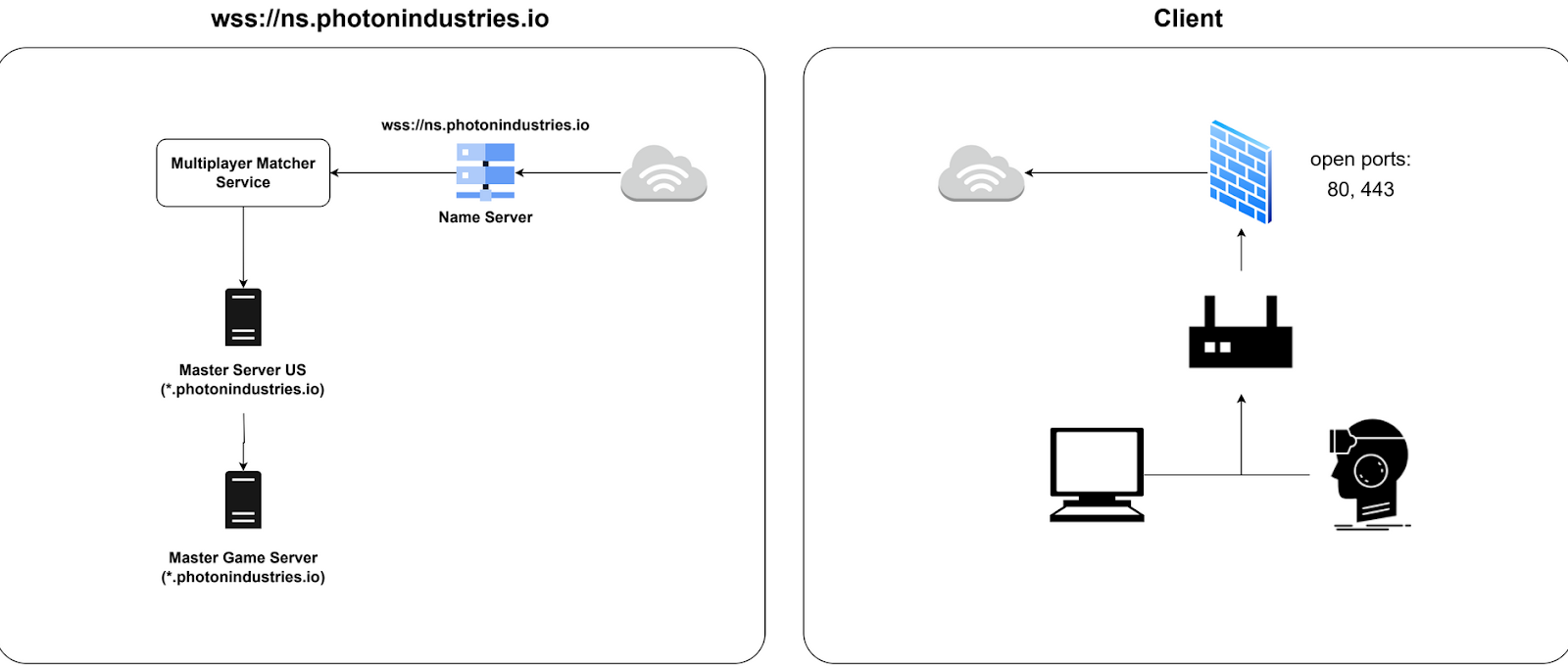
Visual traffic flow between XALTER headsets and cloud infrastructure.